
Effective management reports enable decisions, not just inform — every section should answer “so what?” rather than simply presenting data. The critical design principle is building for the audience and their decisions, not for the data source or available metrics. Reports structured as Summary, Detail, Appendix allow readers to scan first and drill deeper only when needed. Highlighting exceptions and variances rather than normal performance ensures executives see what requires attention. Less is more: clarity beats completeness, and consistency builds trust over time. The difference between well-designed and poorly-designed reports has measurable business impact — time wasted interpreting unclear outputs, decisions delayed by ambiguity, and trust eroded when numbers contradict each other across reports. A structured narrative with numbers in context is fundamentally different from a data dump.
Purpose & Context
Effective management reports are useful, trusted, and actionable. They translate raw data into structured insight that enables confident decisions.
This article addresses the CFO or finance leader who must design or approve report templates. It assumes a reporting framework is in place and focuses on practical design principles rather than theory.
Definition
An effective management report is one that enables decisions, not just informs. Key distinctions:
- Effective reports enable action: They answer “so what?” not just “what happened”
- Different from data dumps: Raw data is not a report
- Different from dashboards: Dashboards show status; reports provide structured narrative
- A report is a structured narrative: Numbers in context, not just numbers
Why This Matters
The difference between well-designed and poorly-designed reports has real business impact:
- Time wasted interpreting unclear reports that require verbal explanation
- Decisions delayed when ambiguity prevents confident action
- Trust eroded when reports require “let me explain what this really means”
- Opportunity cost of over-reporting: too much information obscures insight
Start with the decision
What decision will this report support? Work backward from the decision to the data — not forward from available data to a report.
Define the audience
Who will read this? What decisions are they making? What context do they already have?
Structure: Summary, Detail, Appendix
One page of key insights and actions. Supporting analysis and trends. Raw data for those who need it.
Readers scan first, drill deeper only when needed
Highlight exceptions, not normal performance
Variances from plan. Trends outside expected range. Items requiring attention. Executives don't need to see that everything is fine.
Include context for every number
Prior period comparison. Budget or plan comparison. Benchmark or target reference. Numbers without context are meaningless.
Limit length ruthlessly
One page per decision level. If it doesn't fit, it's too much. Clarity beats completeness — consistency builds trust over time.
Design for the reader, not the data source — every section should answer 'so what?'
Design Principles
Start with the Decision, Not the Data
Ask: What decision will this report support? Work backward from the decision to the data, not forward from available data to a report.
Define the Audience Explicitly
Every report needs a specific audience:
- Who will read this?
- What decisions are they making?
- What context do they already have?
Structure: Summary - Detail - Appendix
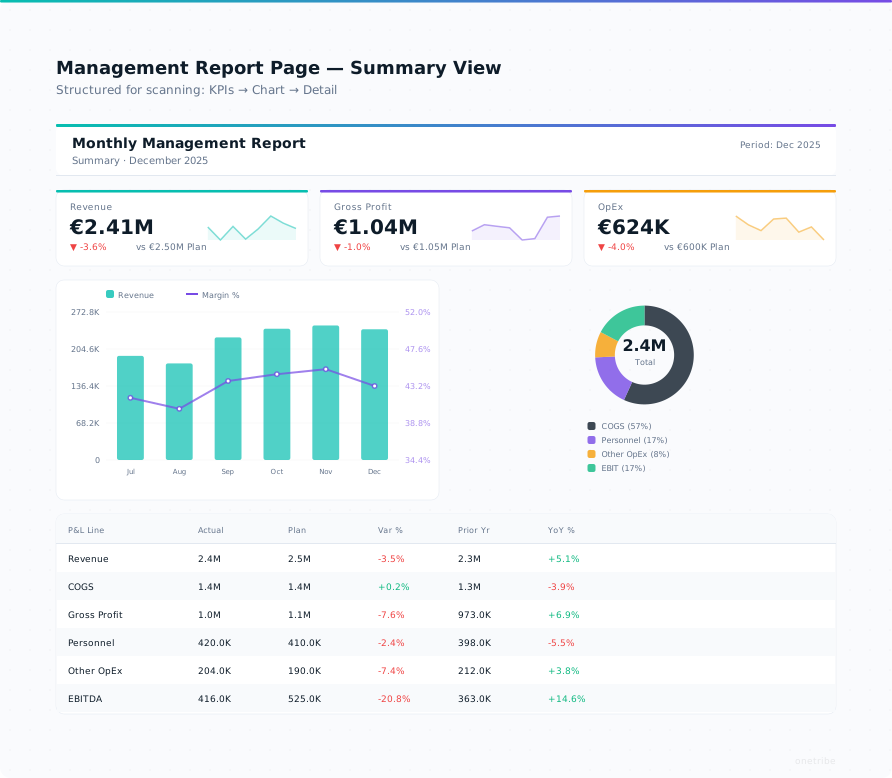
Organize for scanning and drilling:
- Summary: One page, key insights, action items
- Detail: Supporting analysis, trends, comparisons
- Appendix: Raw data for those who need it
Use Consistent Terminology
Align with your organization’s glossary:
- Same term = same calculation everywhere
- Define abbreviations on first use
- Avoid jargon that hasn’t been standardized
Highlight Exceptions, Not Just Results
Executives don’t need to see normal performance. Show:
- Variances from plan
- Trends outside expected range
- Items requiring attention
Include Context
Numbers without context are meaningless:
- Prior period comparison
- Budget or plan comparison
- Benchmark or target reference
- Year-over-year where relevant
Limit Length
One page per decision level:
- Executive summary: One page
- Management detail: One page per topic
- If it doesn’t fit, it’s too much
Common Pitfalls
Including Everything “Just in Case”
More is not better. If readers can’t find what matters, the report fails.
Designing for the Data Source, Not the Reader
Don’t let your ERP or BI tool dictate report structure. Design for the reader, then configure the tool.
Using Jargon Inconsistently
If “contribution margin” means something different in each report, trust collapses.
Mixing Levels of Detail
Executive summary next to transaction detail creates confusion. Separate audiences need separate views.
No Clear “So What”
Every report section should answer: “What does this mean, and what should we do about it?”
Where This Fits in Our Expertise
Effective management reports are the output of the Reporting pillar . They translate raw financial and operational data into structured insight that enables confident decisions.
Building effective reports requires both a solid framework (the structure) and good design (the execution).
Summary
- Effective reports enable decisions, not just inform
- Design for the audience, not the data source
- Less is more: clarity beats completeness
- Every report needs a “so what”
- Consistency builds trust over time
Further Reading
- Management Reporting Framework - The structural foundation
- Reporting Expertise - Our approach to management reporting
- Glossary: Management Reporting - Term definition